User and admin guide
For users
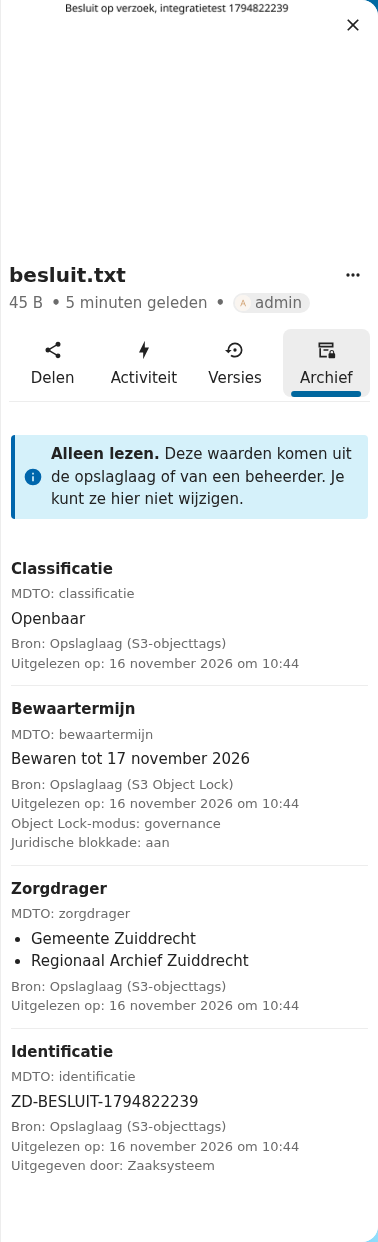
Open a file in Files and choose the Archive tab in the sidebar (Dutch: Archief). It shows four fields:
| Field | What it means |
|---|---|
Classification (classificatie) | The classification of the record, for example Openbaar. |
Retention period (bewaartermijn) | Until when the record must be kept. From S3 Object Lock when the object is locked, with the lock mode and legal hold. |
Custodian (zorgdrager) | The organisation or organisations responsible for the record. |
Identifier (identificatie) | The identifier of the record and, when known, the system that issued it. |
Under every value the tab names its source and the moment it was read. You cannot change the values in Nextcloud. Ask your administrator or the owner of the storage when a value is wrong.
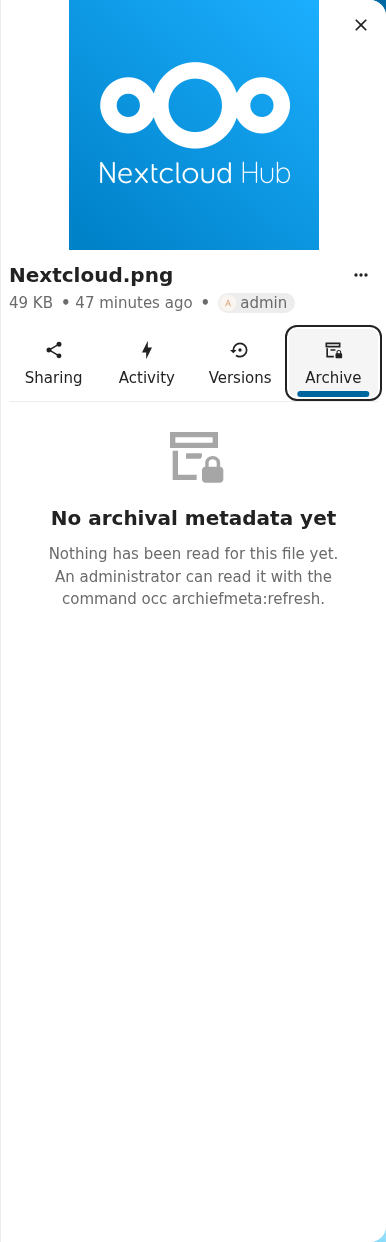
A file without values shows an empty state:
For administrators
Requirements
- Nextcloud 34, 35 or 36
- PHP 8.2 or later
- For storage layer values: primary object storage on S3, or a files_external "Amazon S3" mount. Without S3 the app still works with values an administrator sets.
Install
git clone https://github.com/ConductionNL/archiefmeta.git
cd archiefmeta
npm ci && npm run build
cp -r appinfo lib l10n js img LICENSE /path/to/nextcloud/custom_apps/archiefmeta/
sudo -u www-data php occ app:enable archiefmeta
For a Docker container there is a helper: scripts/install-into-container.sh <container>.
Enabling the app registers the four metadata keys as not editable. Files written before you enabled the app have no values yet. Read them with:
occ archiefmeta:refresh --recursive alice/files
When you redeploy a changed build under the same app version, browsers may keep the old script. Raise the version in appinfo/info.xml or clear the browser cache.
Where values come from
The app asks its sources in a fixed order. Per field, the first source with a value wins.
| Order | Source | Label in the tab | Fields |
|---|---|---|---|
| 1 | S3 Object Lock | Storage layer (S3 Object Lock) | bewaartermijn |
| 1 | S3 object metadata | Storage layer (S3 object metadata) | all four |
| 1 | S3 object tags | Storage layer (S3 object tags) | all four |
| 2 | Administrator, through occ archiefmeta:set | Administrator | all four |
| 3 | Nextcloud file ID | Nextcloud file ID (not durable) | identificatie |
S3 keys
For bewaartermijn the app reads the Object Lock retention of the object (GetObjectRetention: mode and retain-until date) and its legal hold (GetObjectLegalHold). A legal hold without a retention date shows as "No end date (legal hold)". When the object has no lock, the app falls back to the metadata key below.
For the other fields the app reads user metadata first, then object tags with the same name.
| Field | User metadata header | Tag key | Example |
|---|---|---|---|
| classificatie | x-amz-meta-mdto-classificatie | mdto-classificatie | Openbaar |
| bewaartermijn (no lock) | x-amz-meta-mdto-bewaartermijn | mdto-bewaartermijn | 2036-01-01 |
| zorgdrager | x-amz-meta-mdto-zorgdrager | mdto-zorgdrager | Gemeente Zuiddrecht |
| identificatie | x-amz-meta-mdto-identificatie | mdto-identificatie | ZD-2026-0001 |
| issuer of the identifier | x-amz-meta-mdto-identificatie-systeem | mdto-identificatie-systeem | Zaaksysteem |
More than one zorgdrager or classificatie? Separate them with ; in metadata. Tag values cannot hold ;, so use numbered keys there: mdto-zorgdrager-1, mdto-zorgdrager-2. Numbered keys work in metadata too.
Header values must be ASCII. Percent-encode other characters as UTF-8 (Gemeente%20%C3%96); the app decodes them.
Where to set them:
- Primary object storage. The object key is
urn:oid:<fileid>. Nextcloud writes the object, so set tags afterwards, for examplemc tag set s3/bucket/urn:oid:123 "mdto-classificatie=Openbaar". Then runocc archiefmeta:refresh 123. - External S3 mount. The object key is the path inside the mount. A system that writes into the bucket can set user metadata on upload. Run
occ files:scanandocc archiefmeta:refreshto pick it up.
Object Lock setup
Object Lock must be enabled when you create the bucket. Versioning comes with it. A default retention puts a lock on every new object:
mc mb --with-lock s3/archive
mc retention set --default GOVERNANCE 10y s3/archive
Nextcloud core does not yet send version IDs when it deletes from a versioned bucket. A delete then leaves a delete marker and the locked bytes stay. That is tracked separately (nextcloud/server#66498).
Commands
occ archiefmeta:refresh <path|fileid> [--recursive]   read the sources again
occ archiefmeta:show <path|fileid> [--json]           print the stored values
occ archiefmeta:set <path|fileid> [--classificatie=..]... [--zorgdrager=..]...
                    [--bewaartermijn=2036-01-01] [--identificatie=..]
                    [--clear=<field>]... [--clear-all]
A path is relative to the data root, such as alice/files/Report.pdf.
Read only, and how it is enforced
- Each key is registered with
IMetadataValueWrapper::EDIT_FORBIDDEN. Core's WebDAV handler then refuses PROPPATCH for every user. Nextcloud 34 answers HTTP 500 with the message "you do not have enough rights to update 'archiefmeta-…' on this node". A 403 would be the better status; that is a core matter. - The app API has one route:
GET /ocs/v2.php/apps/archiefmeta/api/v1/files/{fileId}. It answers 404 for a file the user cannot access. POST, PUT, PATCH and DELETE answer 405. - Only the storage layer and
occchange values. Both need access users do not have.
Tests
composer install
composer check            # php -l, php-cs-fixer (Nextcloud standard), PHPStan level 8, PHPUnit
npm ci && npm run lint && npm run build
tests/Integration/live-test.sh   # against a running instance, see below
tests/Integration/live-test.sh runs against a live Nextcloud with S3 primary storage and an S3 external mount. It uploads files, sets tags and metadata with the MinIO client, refreshes, and tries to change values through PROPPATCH and the API. Requests, status codes and bodies go to build/integration/evidence.md. Its defaults match Conduction's test environment; override them with environment variables (see the top of the script). Credentials have no default: set ADMIN_PASS, TEST_PASS, S3_KEY and S3_SECRET. The output of a full run is on the PROPPATCH refused evidence page.
The demo script walks through the app in ten minutes.
Limitations
- Identity is not durable yet. Without an identifier from the storage layer,
identificatieshows the Nextcloud file ID with the instance ID. The tab says so. The file ID is unique within one instance only. Durable identity is under discussion with Nextcloud (nextcloud/server#66499). - Values are a snapshot. The app reads the storage layer on write, copy, move and
occrefresh. A tag changed later in S3 shows after the next refresh. The read time in the tab tells you how old a value is. - S3 only. Other storage layers need their own source class. A register as source fits the same interface.
- Schema API switch planned. The storage class moves to the Nextcloud 36 schema API once it is released. See Architecture.
- No public share pages. The tab is hidden on public share links.